Bulk email sender for Gmail
Write one email in Gmail, add recipients from a Google Sheet or a CSV, press Send Mass. Every person gets an individual, personalized message from your own address. MailBrother follows up with everyone who does not reply and shows you the replies that come in.
7,000+ Gmail users · follow-up sequences · reply tracking · AI helpers built in · all features
I noticed {Company} is hiring for support roles. We help teams like yours answer tickets 2× faster from Gmail.
Worth a 15-minute call this week?
Best,
Maria
Three steps, all inside Gmail
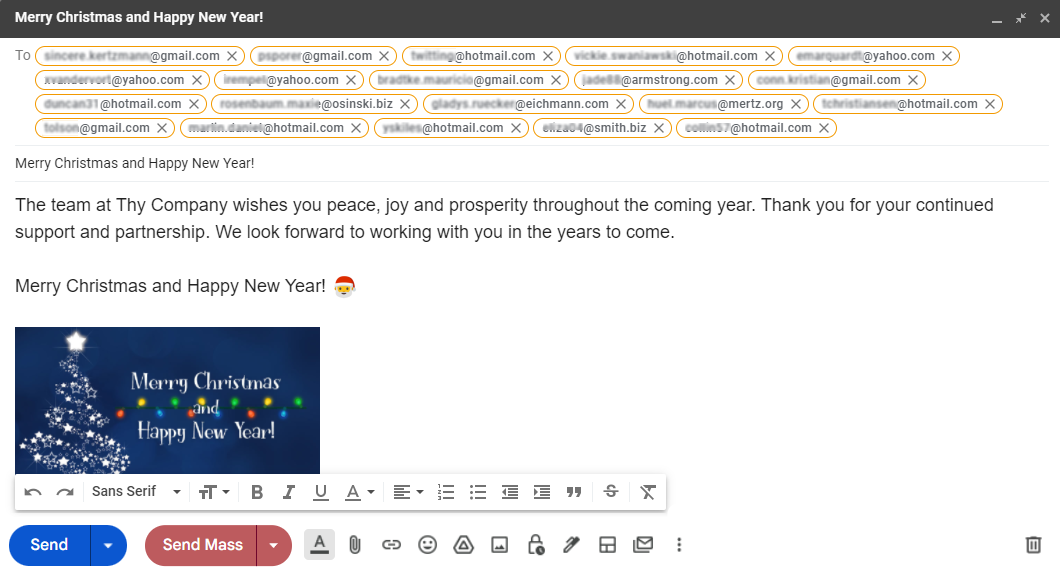
Write the email
Open Gmail, click Compose and write your message as usual. Paste a list of addresses into "To" or import them from a Google Sheet with the MailBrother menu.
Press Send Mass
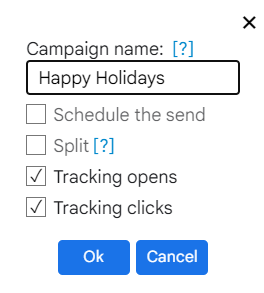
Name the campaign, choose the interval between emails, schedule it or split it across days when the list is bigger than your daily limit. Opens and clicks are tracked by default.
Watch the results
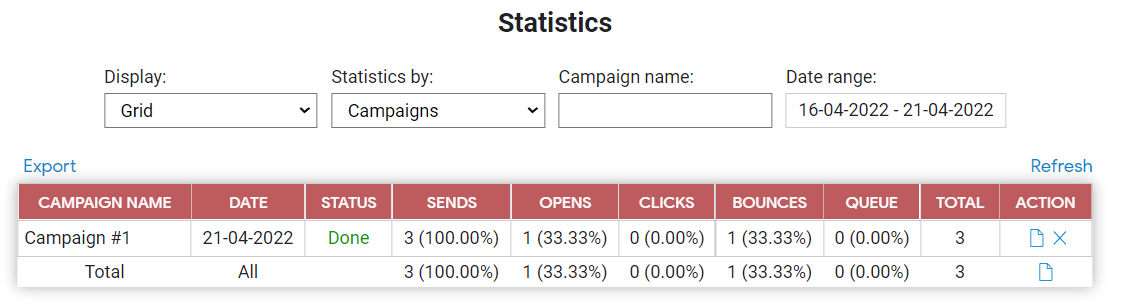
The Campaigns tab in Gmail shows sent, opened, clicked, bounced and unsubscribed per campaign and per recipient. Export the report as a file.
Everything an outreach tool does, without leaving Gmail
Follow-ups if no reply
Up to three steps in the same thread to everyone who has not answered. Stops on a reply, an unsubscribe, a bounce or a click. AI writes the drafts. Docs
Replies, sorted
Real replies detected in your inbox and labelled interested / question / not now / asked to stop, with a one-click AI draft answer. Docs
Check before you send
Checklist, spam score, the email as recipient 1, 2, 3 will see it, a test copy to yourself, and 60 seconds to undo.
Google Sheets mail merge
Import recipients from a sheet and personalize with {Name}, {Company} or any column. Fallbacks like {Name|there} keep emails clean when a cell is empty.
Individual emails
Each recipient gets a separate message. No visible list, no "undisclosed recipients", no BCC that lands in spam.
HTML emails in Gmail
Paste a designed HTML template into the Gmail editor. Styles are inlined automatically so it renders as designed.
Scheduling and pacing
Send now or at a chosen time. Set a delay between emails so your sending looks human to Gmail.
Split sending
A 2,000-address list on a Gmail account is sent 450 a day, automatically, without you touching it again.
Results per recipient
Opens, clicks, replies, bounces and unsubscribes per person; clicked links, mail clients, best time to send, MailBrother averages, a weekly report by email.
Unsubscribe and suppression
One-click unsubscribe headers and link; unsubscribed, bounced and "please stop" addresses are skipped in every future campaign. Docs
Clean lists
Paste addresses or a CSV, verify them (mail server, disposable and role addresses, bounce history), enrich with company data and a personal opening line.
AI where you write
Subject ideas, rewrite in another tone, translate into 16 languages, HTML from a description, spam-risk review. Built in, no extra account. Docs
Stays out of spam
SPF/DKIM/DMARC check, plain-text part, own tracking domain, automatic pause when recipients complain, bounced addresses never mailed twice.
Team plans
One subscription for 5 to 100+ colleagues on the same domain. New teammates join automatically.
Built for people who send from their own Gmail
Small businesses
Announcements, offers and follow-ups to customers who know you, from your real address.
Recruiters and job seekers
Personalized outreach to hiring managers or candidates, one message each.
Musicians, PR and creators
Pitches to radio stations, journalists and podcasts that look like a personal email, because they are.
Teachers, clubs and nonprofits
Messages to parents, members and donors without a newsletter platform.
Free for every feature. Pay to remove the signature.
Free
- Every feature: follow-ups, replies, AI, tracking
- Full Gmail limit: 450 a day on @gmail.com, 1,800 on Workspace
- 40 AI requests a day
- "Sent with MailBrother" signature in each email
Individual
- 300 AI requests a day
- No MailBrother signature
- Priority support
Team
- Everything in Individual
- 5 to 100+ users, one invoice
- Colleagues on your domain join automatically
- Manage seats from Gmail
Before you install
Is it really free?
Yes. Sending, merge, HTML, tracking and scheduling are free without a time limit. The free plan adds a short "Sent with MailBrother" line to each email; paid plans remove it.
How many emails can I send per day?
Gmail decides: about 450 from a @gmail.com address and 1,800 from Google Workspace. MailBrother stays under that and splits bigger campaigns across days. Read the full guide.
Will my account get blocked?
MailBrother paces sending, respects the daily limit and lets you add a delay between emails. Send to people who expect your email, include an unsubscribe link, and keep your list clean.
Does it work with Google Workspace?
Yes. Workspace accounts get the higher limit. If your admin restricts third-party apps, they need to allow MailBrother in the Admin console.
Where do my contacts and emails go?
Emails are sent by Gmail from your account. MailBrother stores campaign metadata for reports and never shares your lists. Privacy details.
How is this different from GMass or YAMM?
Same idea, simpler and free for the core features, with HTML insert and split sending included. See the comparison.
Send your first campaign in two minutes
Install the extension, sign in with Google, press Send Mass.